

Organize views
You can organize views into folders to keep the workspace clean and easy to navigate.
Create folders
Section titled “Create folders”To create a folder use / in the title.
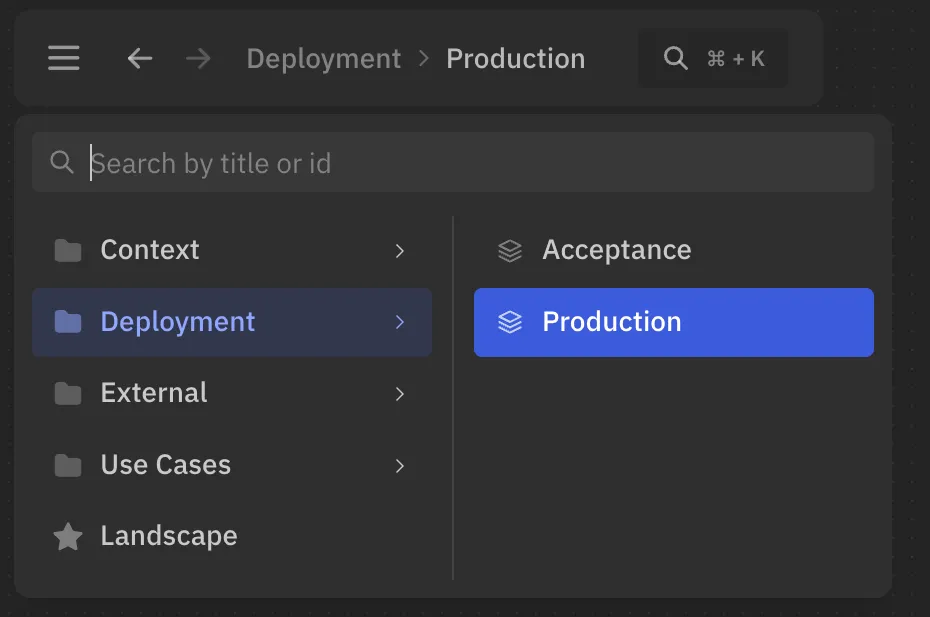
For example, the following view will have the title Production, and will be nested under Deployment folder:
views { view { title 'Deployment / Production' }}On the UI, this view will be displayed as:
Order views
Section titled “Order views”Views in the same folder can be ordered with order followed by a non-negative integer.
Views with an explicit order are shown first in ascending order. Views with the same order, and views without an order, keep their declaration order.
Folders are still sorted alphabetically.
views {  view api {    title 'Services / API'    order 1  }
  dynamic view checkout {    title 'Services / Checkout flow'    order 2  }
  deployment view production {    title 'Services / Production'  }}
Views can be defined in the same file, but placed in different folders:
views {  dynamic view {    title 'Use Cases / 16.2 Checkout / Checkout flow'  }
  deployment view {    title 'Deployments / Staging / Checkout microservice'  }}
Common folder
Section titled “Common folder”You can specify a common folder for the views block.
Every view defined inside will be placed under that folder:
// Common folder for all views in the blockviews 'Domain 1 / Subdomain' {
  view {    // Will be displayed as 'Domain 1 / Subdomain / Landscape'    title 'Landscape'  }
  dynamic view {    // You can add nested folder    // Will be displayed as 'Domain 1 / Subdomain / Use Cases / 16.2 Checkout'    title 'Use Cases / 16.2 Checkout'  }}