

AspireC4
AspireC4 is a .NET Aspire extension library that auto-generates live LikeC4 architecture diagrams from the Aspire resource graph. Diagrams update in real-time as resources start, stop, or produce errors — and each element links back to the corresponding Aspire dashboard page.
Prerequisites
Section titled “Prerequisites”- Docker (required by default) — the LikeC4 server runs as a
ghcr.io/likec4/likec4container sidecar. - Alternatively, use
.WithLocalCLI()to run via a locally-installed Node.js CLI (npx,pnpm,yarn,bun, ordeno).
Quick Start
Section titled “Quick Start”Add AspireC4.Hosting to your AppHost project, then call AddAspireC4():
var builder = DistributedApplication.CreateBuilder(args);
// Add your services ...var api = builder.AddProject<Projects.MyApi>("my-api");
// Register the LikeC4 visualization sidecar.builder.AddAspireC4();
builder.Build().Run();
This will:
- Write a
./likec4/model.gen.c4file from the Aspire resource graph. - Start a
ghcr.io/likec4/likec4Docker container serving the live diagram. - Watch for resource state changes and regenerate the file automatically.
This simply adds the AspireC4 hosting extension to the AppHost builder.
var builder = DistributedApplication.CreateBuilder(args);builder.AddAspireC4();
// ...add other projects/resources such as databases, services, etc.
builder  .AddProject<Projects.Web>("web")  .WithReference(db);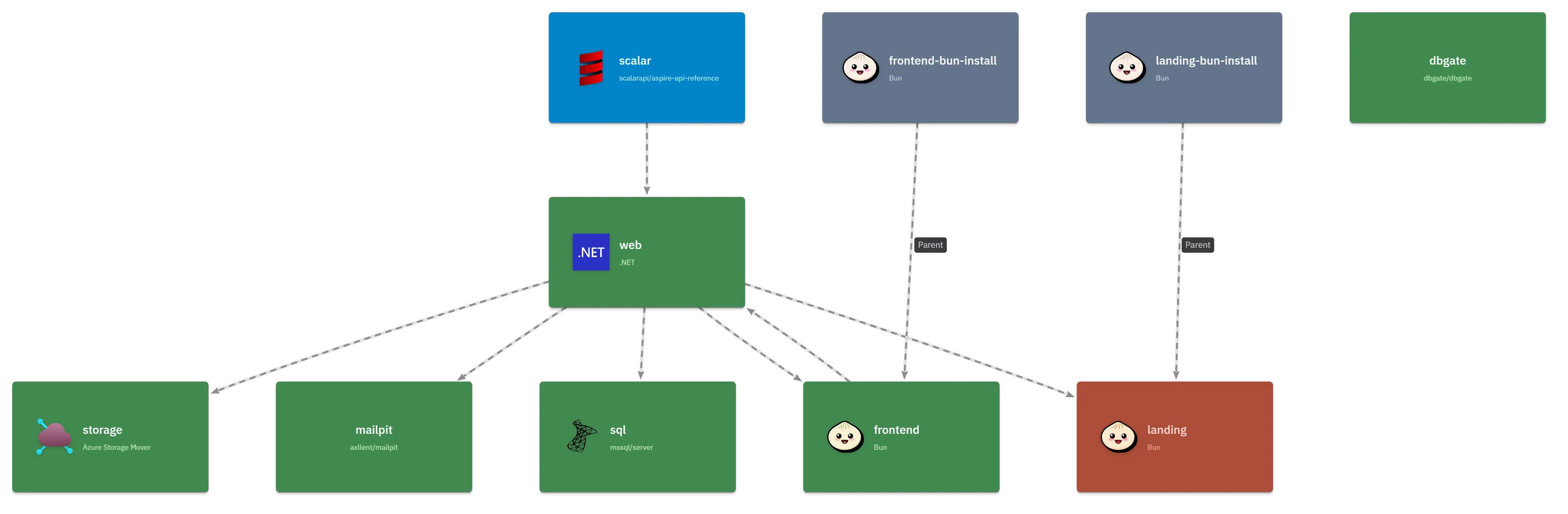
This simply adds the AspireC4 hosting extension to the AppHost builder.
var builder = DistributedApplication.CreateBuilder(args);builder.AddAspireC4(opts => {  opts.Title = "MakerStack Architecture";});
// ...add other projects/resources such as databases, services, etc.
builder  .AddProject<Projects.Web>("web")  .WithLikeC4Details(opts => {    opts      .WithLabel("Web Host")      .WithSummary(".NET 10/ ASP.NET Minimal API web app. Hosting APIs, and the Astro-based landing site and the MarkerStack SPA");  })  # Note the reference to the database resource (db) here, to save you from calling .WithReference(db) as well...  .WithLikeC4Reference(db, opts => {    opts      .WithLabel("Tabular Data Stream (TDS)")      ... etc  });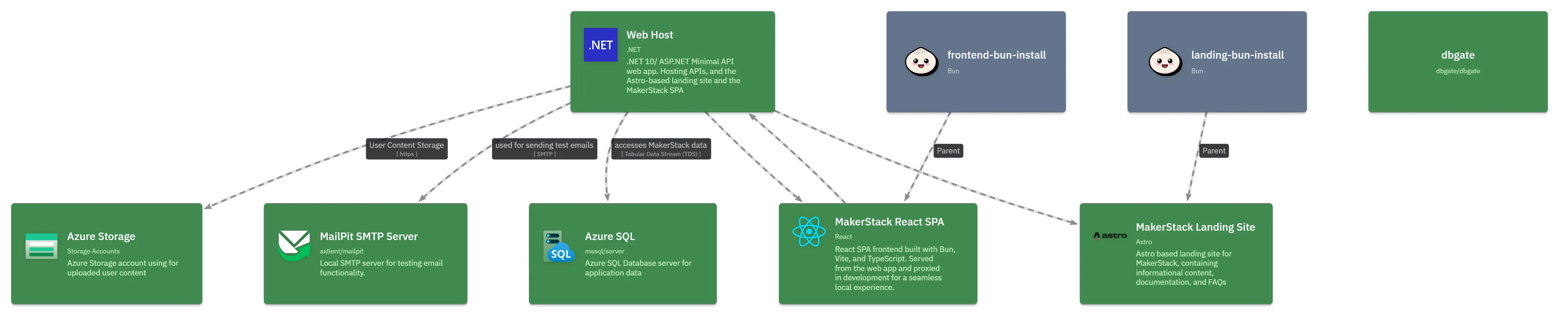
How It Works
Section titled “How It Works”Data Flow
Section titled “Data Flow”Aspire resources │ ▼LikeC4ModelBuilder.Build() ← resource states, dashboard URL │ ▼LikeC4DSLGenerator.Generate() │ ▼./likec4/model.gen.c4 ← written to disk (and Docker volume) │ ▼ghcr.io/likec4/likec4 ← serves the diagram, hot-reloads on file changeResource State Colors
Section titled “Resource State Colors”Each Aspire resource is represented as a LikeC4 element. Its color reflects the live runtime state:
| State | Color | Description |
|---|---|---|
| Unknown | default | Not yet started |
| Starting | sky | Resource is initializing |
| Running | green | Healthy and running |
| Stopping | slate | Winding down (60% opacity) |
| Exited | muted | Stopped cleanly (30% opacity) |
| Failed | amber | Exited with a non-zero code |
| Error | red | Reported an error state |
Dashboard Deep-Links
Section titled “Dashboard Deep-Links”When IncludeAspireDashboardLinks is enabled (the default), each LikeC4 element receives two links:
- Dashboard: Console Logs →
/consolelogs/resource/{name} - Dashboard: Structured Logs →
/structuredlogs/resource/{name}
Links are built at runtime once the Aspire dashboard reaches the Running state. With a browser token (default Aspire setup), the links embed the token for seamless authentication.
To disable dashboard links:
builder.AddAspireC4(options =>{ options.IncludeAspireDashboardLinks = false;});Alternative Modes
Section titled “Alternative Modes”Local CLI (WithLocalCLI)
Section titled “Local CLI (WithLocalCLI)”Uses a locally-installed likec4 CLI (via npx/pnpm/yarn/bun/deno) instead of the Docker container:
builder.AddAspireC4().WithLocalCLI();Hide from Dashboard (WithHideFromDashboard)
Section titled “Hide from Dashboard (WithHideFromDashboard)”Removes the LikeC4 sidecar from the Aspire dashboard resource list and surfaces the diagram URL as a link and command on each ProjectResource:
builder.AddAspireC4().WithHideFromDashboard();Excluding Resources
Section titled “Excluding Resources”A resource is excluded from the diagram if:
- It carries an
ExcludeFromLikeC4Annotation, or - Its
ResourceSnapshotAnnotation.InitialSnapshot.IsHidden == true(Aspire internal resources).
The LikeC4 sidecar resource itself is always excluded.
Limitations
Section titled “Limitations”- Static diagram tool: LikeC4 renders a file-based diagram. State updates require an HMR refresh.
- Dashboard URL discovery: If the Aspire dashboard hasn’t started when the first diagram is generated, dashboard links will be absent until it reaches
Runningand triggers a regeneration. - Browser token in generated file: The Aspire browser token appears in the
.c4file embedded in dashboard link URLs. Do not commit the generated file to source control. - Windows HMR relay: On Windows, a TCP relay bridges the fixed host port
24678to the dynamically-allocated Docker port for Hot Module Replacement.